Tasks
The Tasks tab is a two-pane screen: a task list on the left, the open task on the right. It's where a subject comes together — its Slack threads, PRs, issues, branches and notes side by side.
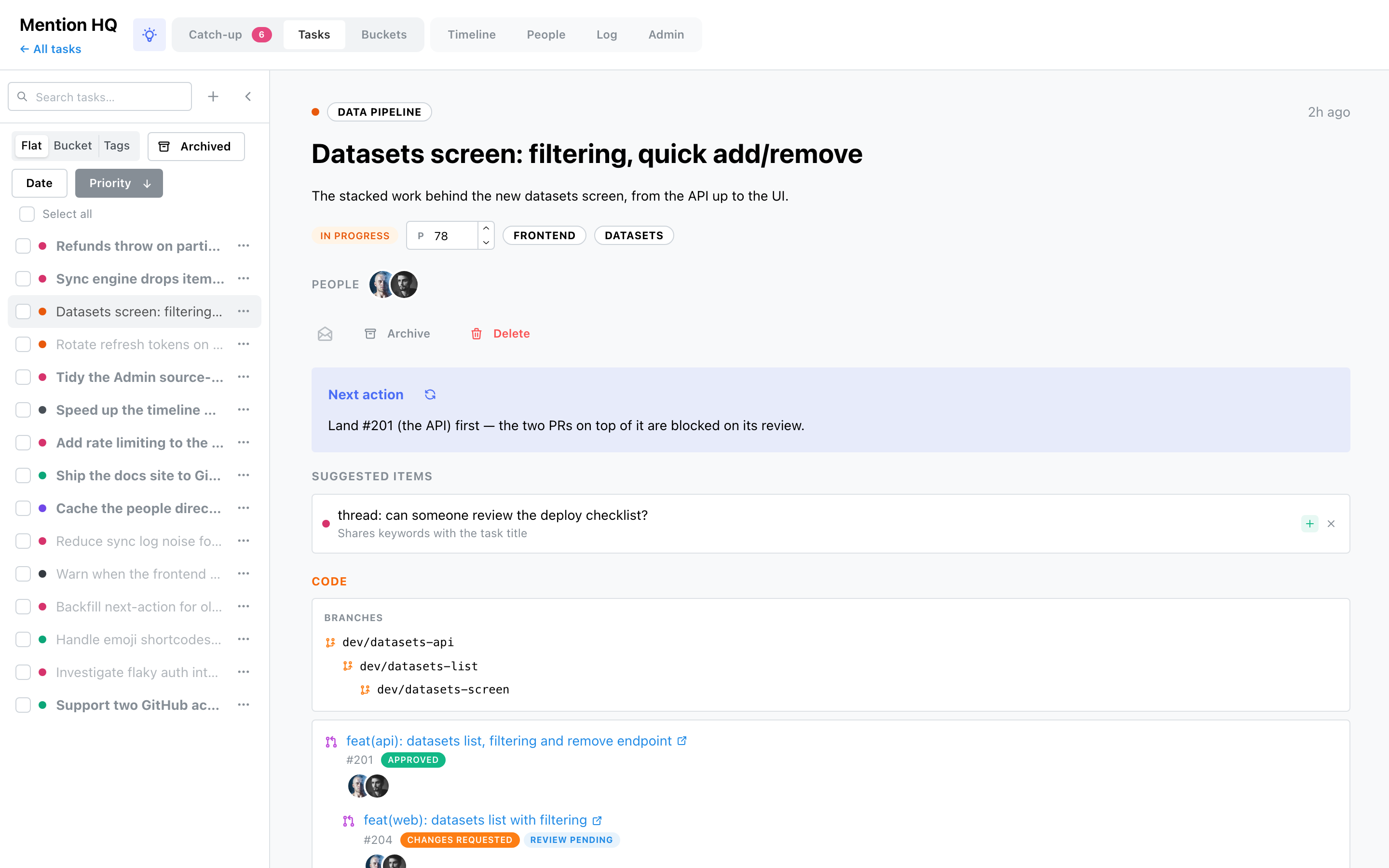
The task list
- Search tasks (focus with ⌘/Ctrl-K), and + to create one.
- Group the list Flat, by Bucket or by Tags; sort by Date or Priority (click again to flip the direction).
- Archived switches the list to archived tasks.
- Collapse the sidebar, or drag its edge to resize (the width is remembered).
- Each row has a ⋯ menu to Archive/Restore or Delete, and a checkbox — tick several (or Select all) to bulk archive or delete.
The task
Opening a task marks it read. The header shows its bucket (with a Suggest bucket button when it's still Uncategorized), an Archived badge if archived, and the age of its newest item.
What you can edit here:
- Description — click the text to edit inline; blur saves, Escape cancels.
- Priority — a 0–100 field; higher sorts first.
- Read / archive / delete — the action row. Archiving returns you to the list; deleting warns that the task's items return to catch-up to be triaged again (archive instead to keep them filed).
Status, tags and the merged people strip are shown but set elsewhere — status and tags follow the task's items on sync; people resolve through the directory.
Next action (if the AI brain is configured) is a one- or two-sentence concrete next step, precomputed so it's there on open, with a refresh button to recompute it.
Suggested items are the engine's proposals for this task — each with Attach (green +) to file it or Dismiss (×) to reject it.
The two lanes
A task's items split into two columns.
Activity
Everything that isn't code: Slack leads in its own section, then Linear issues, Notion pages, todos, notes and the rest. Each is a card linking out to its source; note items have an inline edit pencil.
The Code lane
PRs and local git branches, laid out like the git-spice stack comment on GitHub rather than a flat list:
- a single Branches card draws every local branch as an indented git-spice stack (a branch that's been deleted from the repo is struck through and pilled deleted);
- a git-spice stack of PRs collapses into one card — the PRs as a tree, base to top, each with its number, review-status pill and reviewers;
- a standalone PR gets its own card.
A PR joins the local branch it was pushed from, so the whole stack — issue, branches and PRs — reads as one coherent unit. See Sources → GitHub / Local Git for where the stack and review data come from.